WizyEMM now auto-populates and locks the device serial number and name in the Splashtop Streamer managed configuration for organizations with Splashtop remote control enabled. This ensures consistent and accurate device identification in Splashtop without manual admin input. Note that this premium feature requires the Splashtop integration to be natively enabled for your organization.
Procedure: How to Verify or Apply Auto-Configuration
Follow these step-by-step instructions to view or apply the automated identification settings within your device profile:
Access your Profile Applications Log in to your WizyEMM console, navigate to Profile Management, and select the specific device profile assigned to your fleet.
Open Splashtop Streamer Configuration Go to the Applications tab within the profile settings. Locate Splashtop Streamer (package name: com.splashtop.streamer.csrs) and click on its Configuration button.
Review the Pre-Populated and Locked Fields Inside the managed configuration dialog box, you will find that the critical identification fields are fully handled for you and locked against manual tampering:
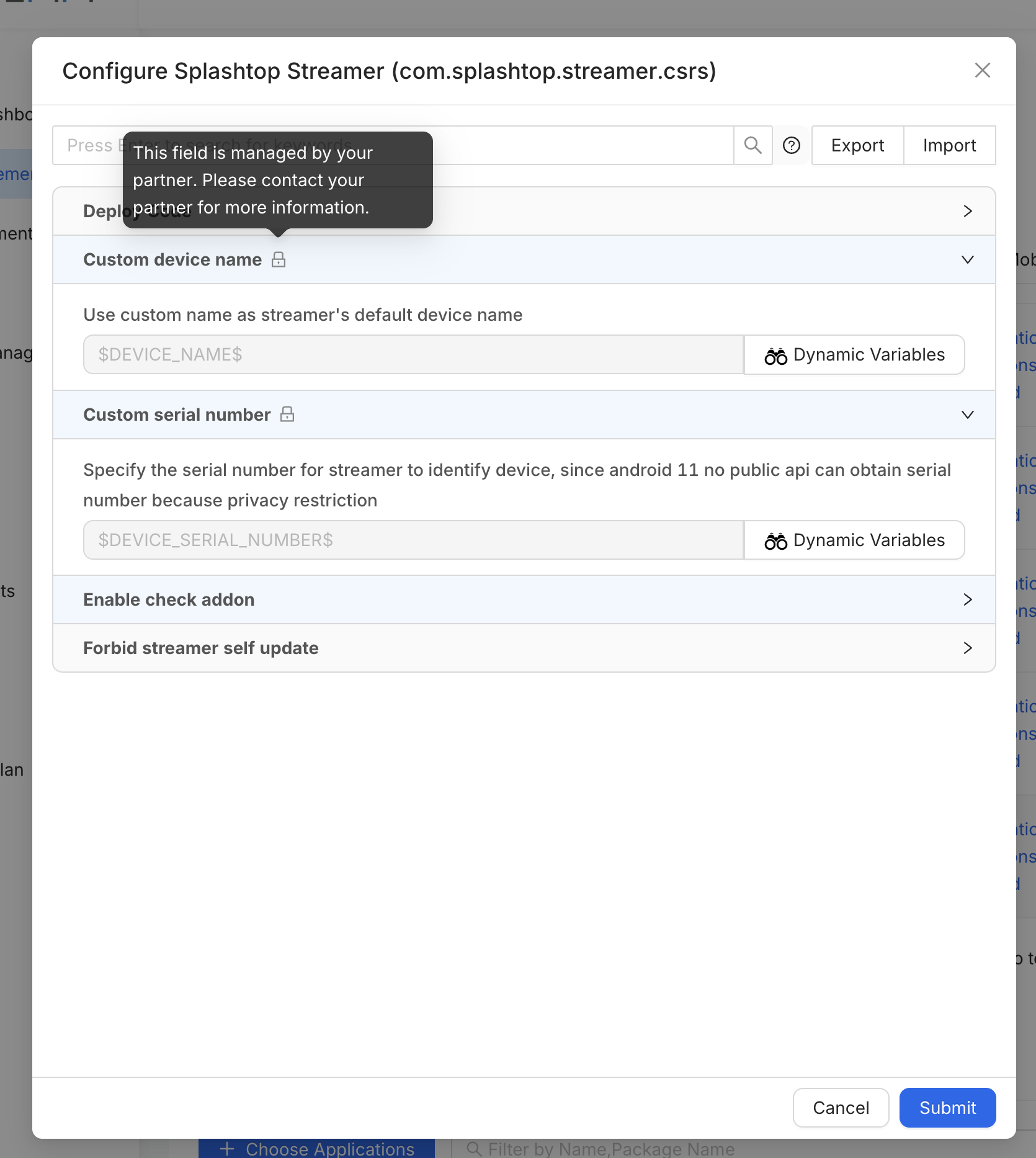
Custom device name: Automatically populated and locked with the $DEVICE_NAME$ dynamic variable.
Custom serial number: Automatically populated and locked with the $DEVICE_SERIAL_NUMBER$ dynamic variable.
Note: Because of modern Android privacy restrictions, public APIs cannot easily grab hardware serial numbers on Android 11+ devices. WizyEMM securely passes this value via this automated variable field. A lock icon will appear next to these headers, displaying a tooltip stating: "This field is managed by your partner. Please contact your partner for more information."
4. Save and Deploy Changes Click the Submit button at the bottom right of the app configuration modal, then remember to click Save at the top right of the profile page to deploy these seamless identification settings to your fleet.
Was this article helpful?
That’s Great!
Thank you for your feedback
Sorry! We couldn't be helpful
Thank you for your feedback
Feedback sent
We appreciate your effort and will try to fix the article