WizyEMM has introduced a direct upgrade link within the console to streamline the transition to a Managed Google Domain. This shortcut simplifies the setup process, reducing the time required for organizations to move to managed Google services with minimal operational disruption.
Configuration Steps:
Log in to the WizyEMM console.
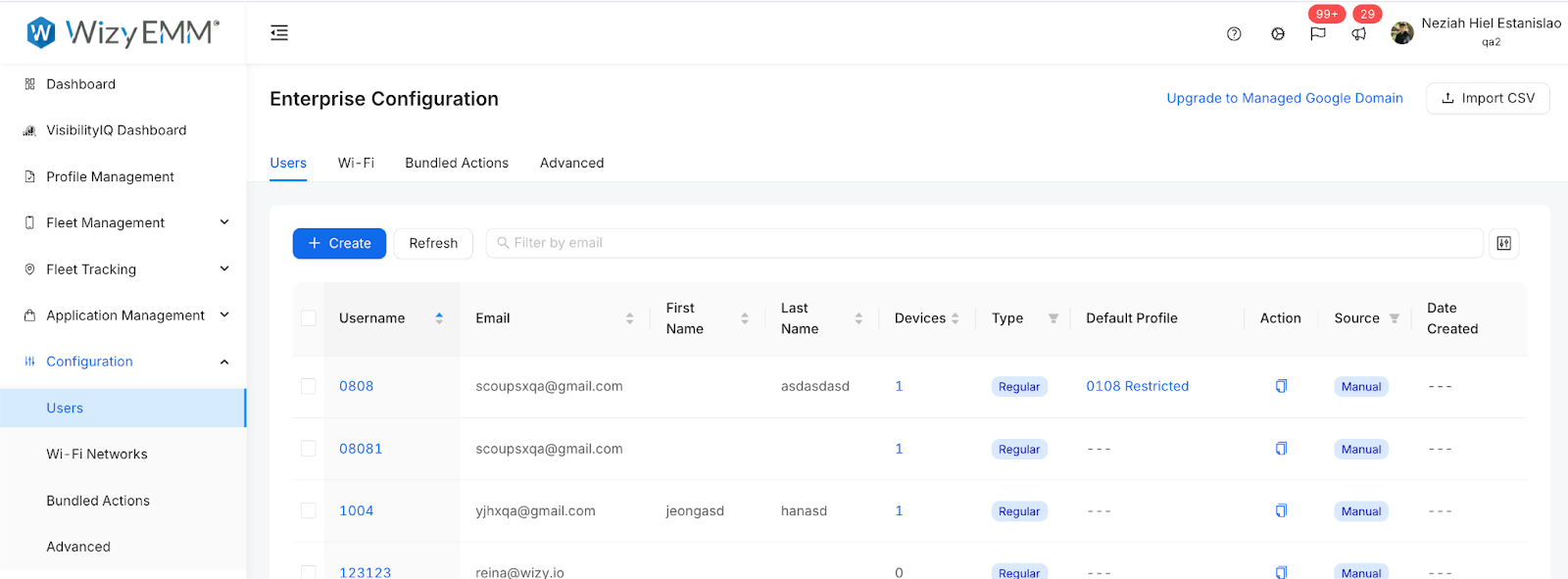
Navigate to the Configuration section in the left-hand sidebar.
Select the Users tab.
Locate and click the "Upgrade to Managed Google Domain" link found at the top right of the Enterprise Configuration interface.
Follow the on-screen prompts to complete your domain integration.
Key Benefits:
Simplified Transition: Provides a clear, direct path for organizations looking to upgrade their Google service integration.
Reduced Setup Time: Minimizes the manual navigation required to find and initiate the upgrade process.
Minimal Disruption: Helps organizations migrate to managed services efficiently, ensuring continuity for existing users and devices.
Was this article helpful?
That’s Great!
Thank you for your feedback
Sorry! We couldn't be helpful
Thank you for your feedback
Feedback sent
We appreciate your effort and will try to fix the article