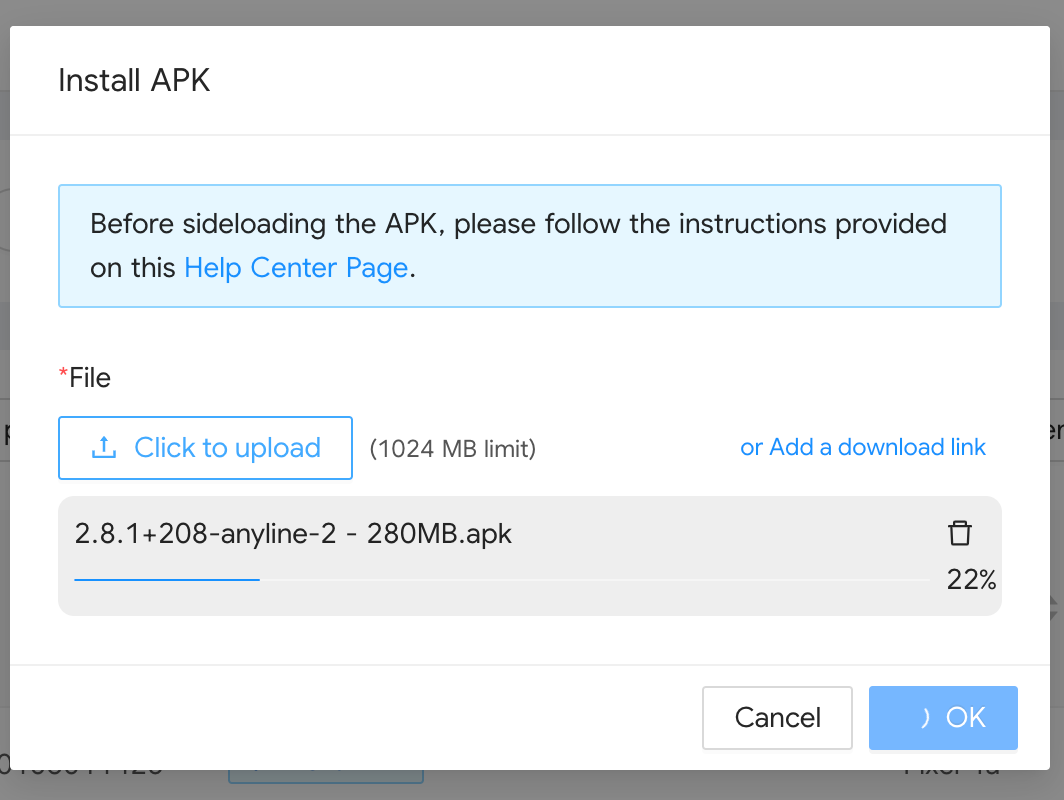
We have increased the maximum file size limit for uploading APKs when performing bulk installation actions on devices.
This enhancement directly impacts the following remote actions:
Install APK
Run Bundled Action (when including an APK install)
The new file size limit is 1024 MB (1 GB), increased from the previous limit of 25 MB, which allows for the deployment of larger, more comprehensive applications to your device fleet.
Troubleshooting Steps
To deploy an APK using the increased limit, follow these standard bulk action steps:
Log in to the WizyEMM console.
Go to Fleet Management > Android Device List.
Select the devices you want to install the APK on by ticking the checkbox next to their serial numbers.
On the upper right, click Actions.
Select the Install APK option.
You can now upload APK files up to 1024 MB directly or provide a public download link.
Was this article helpful?
That’s Great!
Thank you for your feedback
Sorry! We couldn't be helpful
Thank you for your feedback
Feedback sent
We appreciate your effort and will try to fix the article